

How do I integrate my Smoobu units with the Operto dashboard?
Please request your API Key from Smoobu and send it to support@operto.com
Please note, that you will enter the address for each of your units (accommodations) for Operto to be able to display them on your dashboard.
How do I set up my guest messages to include the Operto access codes?
Follow these steps to set up guest messaging in your Smobu account.
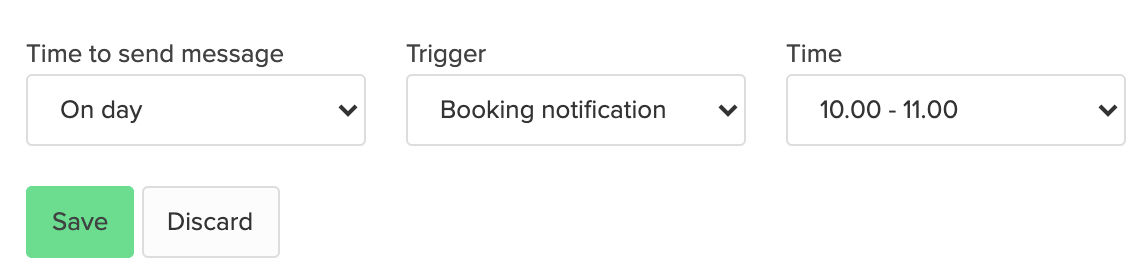
When do I schedule the email to go out to my guests with the access codes?
The best practice is to send an email with access codes 1 day after the reservation has been created.
Alternatively or additionally you can schedule the email to also go out 1 day before arrival.
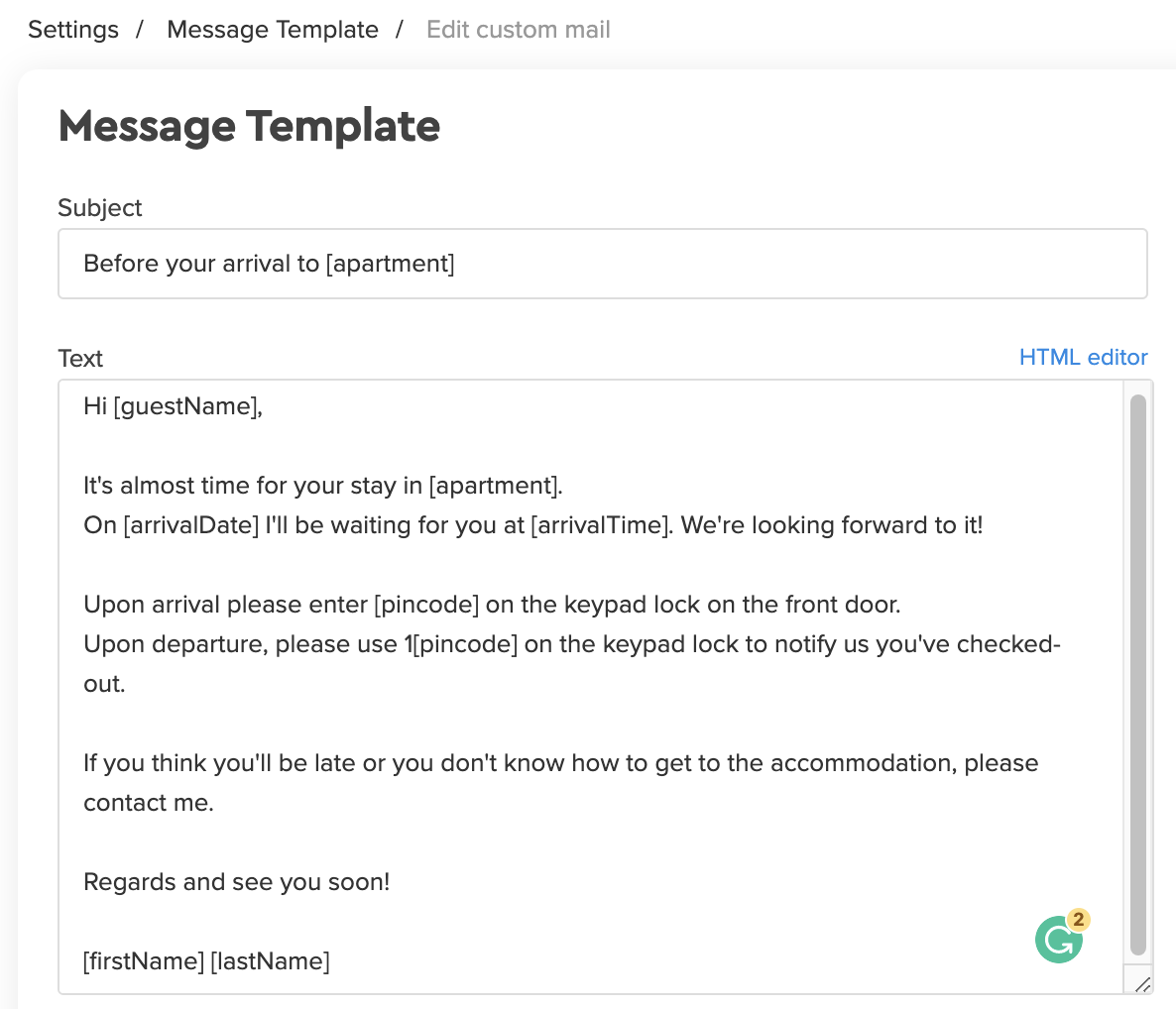
What is the variable used to send access codes from Operto to Smoobu?
For check in codes: [pincode]
For check out codes: 1[pincode]
What is the variable used to send the Operto Guest Portal link to my guest?
The Guest Portal link to display in Smoobu is:
https://guests.operto.com/CompanyID_[bookingID]
- company code: you will get your company code from Operto and will need to include it in the link. This will be the same code for all guest portals.
- bookingID: This is the unique booking id in Smoobu. This id generates automatically on Smoobu and will be different for each guest portal link.
Can I cancel a guest reservation in the Operto dashboard?
No, all cancellations should go directly through Smoobu.
Can I modify a guest check-in/check-out time in the Operto dashboard?
Yes, however, please note that if you do this, it severs the connection between Operto and Smoobu, and no future updates will be received by Operto. We would strongly suggest you make these types of changes through Smoobu instead.
Can I modify a guest check-in/check-out date in the Operto dashboard?
Yes, however, please note that if you do this, it severs the connection between Operto and Smoobu, so no future updates will be received by Operto. We would strongly suggest you make these types of changes through Smoobu instead.
Can I create a brand new reservation in the Operto Dashboard and bypass Smoobu entirely?
Yes, you can. Simply select the unit, click on 'add new reservation' on the top right of the page.
What happens when I re-assign a reservation to another unit in Smoobu?
Re-assigning a reservation to a different unit in Smoobu will not reflect on your Operto Dashboard. The reservation will remain on the unit initially booked and a new reservation won't be created on the new unit. In this case, we recommend you "revoke access" for the reservation on Operto and create a manual reservation on the new unit to ensure the guest's code will be installed on that lock. In this case, you will need to enter the guest access code manually into your Smoobu guest messaging.
What happens if a canceled reservation is re-activated on Smoobu?
If you need to reinstate a canceled reservation under the Canceled reservation drop-down menu in Smoobu, the reservation will change from canceled to confirmed status on Operto and the access code will be installed on the lock for the guest's check-in.