
FAQ-s for Hostfully
How do I integrate my Hostfully units with the Operto dashboard?
Follow these steps to integrate your units.
How do I set up my guest messages to include the Operto access codes?
Follow these steps to set up guest messaging in your Hostfully account.
When do I schedule the email to go out to my guests with the access codes?
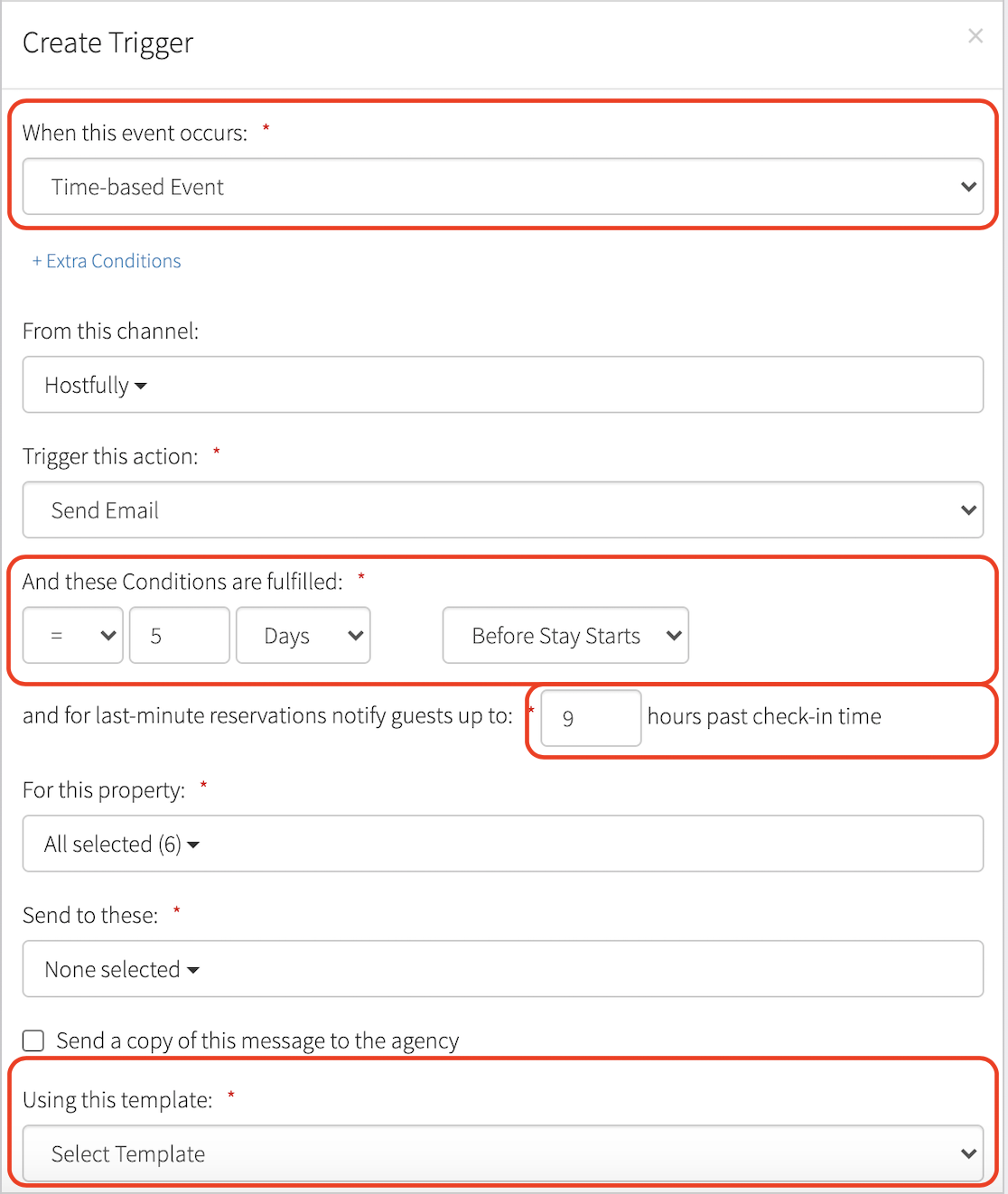
- Under Templates and Triggers, select the "Triggers" tab.
- Select Time-based event.
- Select when you’d like the template to be sent. It is recommended to schedule the template to go out 5 days and 1 day before check-in.
- Select how many hours after check-in time the template should go out for same-day reservations.
- Select your template to schedule.
What is the variable used to send access codes from Operto to Hostfully?
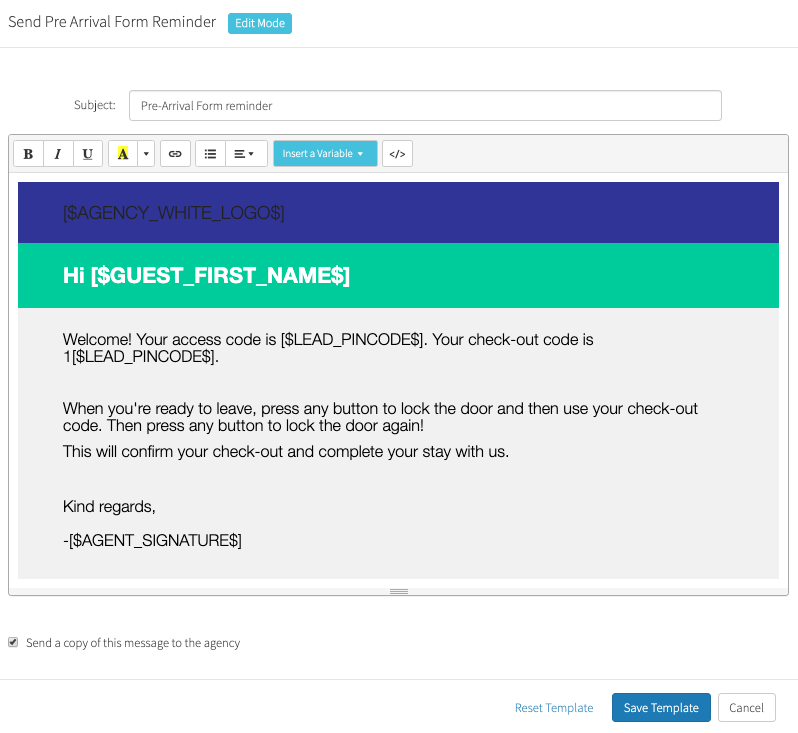
- Select Templates and Triggers → Choose the message used for guest confirmation or guest welcome emails.
- Select Insert Variable and choose Pincode. Use the variable ‘pincode’ to insert the code into your check-in and pre-checkout instructions. Placing the number 1 before the variable string will embed the check-out code.
Note: If the variable is typed in manually instead of selecting it from the dropdown menu, the variable will not work.
What is the variable used to send the Operto Guest Portal link to my guest?
The Guest Portal link to display in Hostfully is:
https://guests.operto.com/CompanyID_[$LEAD_UID$]
- The Company ID can be found on the top of your Operto Connect Dashboard.
- $LEAD_UID$: This is the unique reservation ID in Hostfully, which will be different for each guest portal link.
Note: When inserting the Lead UID variable, ensure it is selected from the dropdown menu. If typed manually, it won’t work.
Can I cancel a guest reservation in the Operto dashboard?
No, all cancellations should be processed directly through Hostfully.
Can I modify a guest check-in/check-out date in the Operto dashboard?
Yes, but please note that modifying this will sever the connection between Operto and Hostfully. No future updates will be received by Operto. We recommend making these changes through Hostfully.
Can I create a brand new reservation in the Operto dashboard and bypass Hostfully entirely?
Yes, simply select the unit, click on "Add New Reservation" at the top right of the page.
What happens when I re-assign a reservation to another unit in Hostfully?
Re-assigning a reservation to a different unit in Hostfully will not reflect on your Operto Dashboard. The reservation will remain on the originally booked unit. We recommend you "revoke access" for the reservation in Operto and manually create a new reservation for the updated unit to ensure the correct code is installed. Please note, you’ll need to communicate the new access code to the guest manually.
What is the difference between a reservation and blocked dates in Hostfully?
When you block dates in Hostfully, Operto will receive it as a reservation with the name "blocked." If the block is removed in Hostfully, it won’t reflect in Operto. You will need to manually revoke access in the dashboard. Cancelled reservations will automatically be removed from the Operto dashboard.