

How do I integrate my Avantio units with the Operto dashboard?
Follow these steps to integrate your units.
How do I set up my guest messages to include the Operto access codes?
Direct guest messaging including access codes is currently not supported for Avantio. Guest codes will be sent out directly from Operto to your guests.
Follow these steps to set up guest messaging.
How do I set up my guest messages to include the Operto guest portal link?
Direct guest messaging including the guest portal link is supported by Avantio.
You will need to contact Avantio and ask them to add the 'Electronic lock block' in your templates interface on Avantio.
Once the Electronic lock block has been enabled you will be able to add to your guest messages. 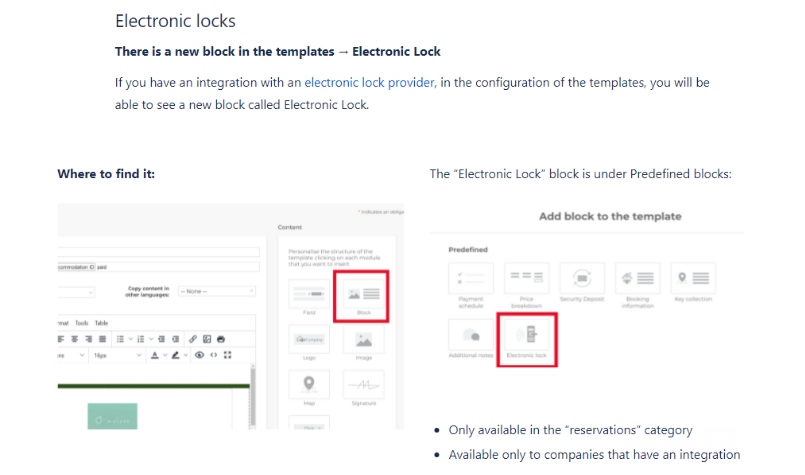
When do I schedule the email to go out to my guests with the access codes?
A check-in email containing the access code will go out to guests 5 days and 1 day prior to check-in. For last minute reservations, the check-in email will be sent out within 10 minutes. Please provide your template to support@operto.com
What is the variable used to send access codes from Operto to Avantio?
The guest automated messaging will be set up by Operto. Therefore, no variables are necessary.
Can I cancel a guest reservation in the Operto dashboard?
No, all cancellations should go directly through Avantio.
Can I modify a guest check-in/check-out time in the Operto dashboard?
Yes, however, please note that if you do this, it severs the connection between Operto and Avantio, and no future updates will be received by Operto. We would strongly suggest you make these types of changes through Avantio instead.
Please make sure to update your check-in and check-out time for each reservation within Avantio, as the times set up in Avantio will be the ones reflecting on Operto to generate a code installation/deletion.
Why do I have a check-in/check-out time of mid-night for some reservations?
Avantio sets the check-in/check-out time as midnight of the check-in/check-out date by default. In order to fix the time, you would need to update it in Avantio. Once the new time will be reflected in Operto.
Please note: if you have edited the reservation in Operto before updating the time, this change will not be reflected.
Can I create a brand new reservation in the Operto Dashboard and bypass Avantio entirely?
Yes, you can. Simply select the unit, click on 'add new reservation' on the top right of the page.
What happens when I re-assign a reservation to another unit in Avantio?
If you re-assign a guest from one unit to another in Avantio, the reservation will be removed from the original unit on Operto and be saved in the new unit. The Guest Code will remain the same for the reservation.