
To Integrate Properties with Operto
- Contact Avantio support and request activation on the Operto platform.
- Avantio will generate and give you web service credentials for your account.
- Send Operto (support@operto.com) the web service login credentials.
Guest Messaging
It is important to note that Guest Messaging sent out from Avantio can ONLY include Operto Guest Portal Link but not the code itself.
To Set Up Your Guest Messaging to Send Guest Portal Link
If you are not using Guest Portal, we will need to send the access codes for you (further details in the next section).
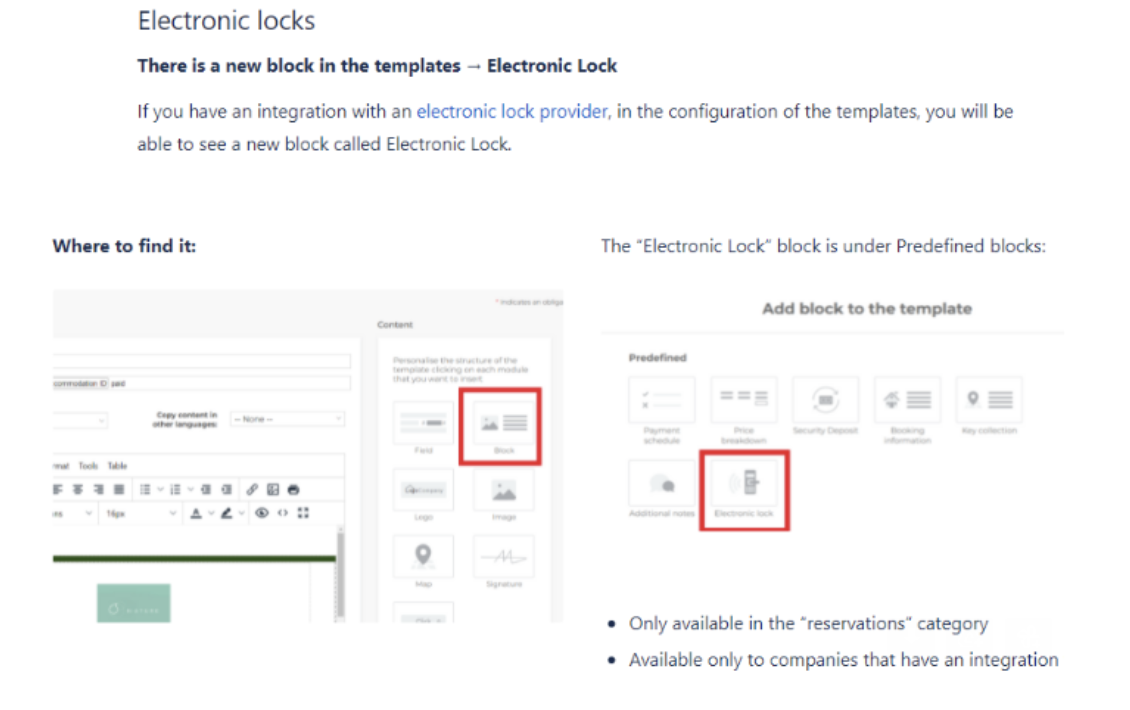
- Contact Avantio and ask them to add the 'Electronic lock block' in your templates interface on Avantio
- Once the Electronic lock block has been enabled you will be able to add to your guest messages.
To Set Up Your Guest Messaging to Send Access Codes
Direct guest messaging including access codes is currently not supported for Avantio. Therefore guest codes will be sent out directly from Operto to your guests.
A check-in email containing the access code will go out to guests 5 days and 1 day prior to check-in. For same-day reservations, the access code will be sent to the guest within an hour of the reservation.
Please provide the content you want in this email (see example below) to support@operto.com.
Greetings and welcome to PROPERTYNAME! We're excited to have you stay with us and trust you will have a pleasant and comfortable stay.
When you arrive, please use 2345 in the keypad lock on the front door. The code will be active at check-in time and expire at check-out. You will need to press the check-mark button after your entry code.
When you checkout, please use 12345 in the keypad lock. This will tell us that you've checked out.
Sincerely,
PROPERTYNAME