
Overview
Backup codes are temporary access codes for guests in case their original code doesn’t install correctly. These codes are non-expiring and available until they are manually deleted, so they should not be used regularly.
Understanding Virtual Door and Primary Unit Codes
A "Virtual Door" is like a master unit that connects with "Primary Units." When a backup code is deleted from the Virtual Door, a new code is automatically generated and shared with all linked Primary Units.
-
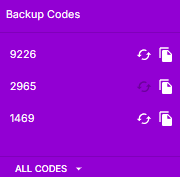
Primary Unit Codes: Codes created at the Primary Unit level will show a highlighted refresh button, while codes from the Virtual Door have a grayed-out refresh button.
-
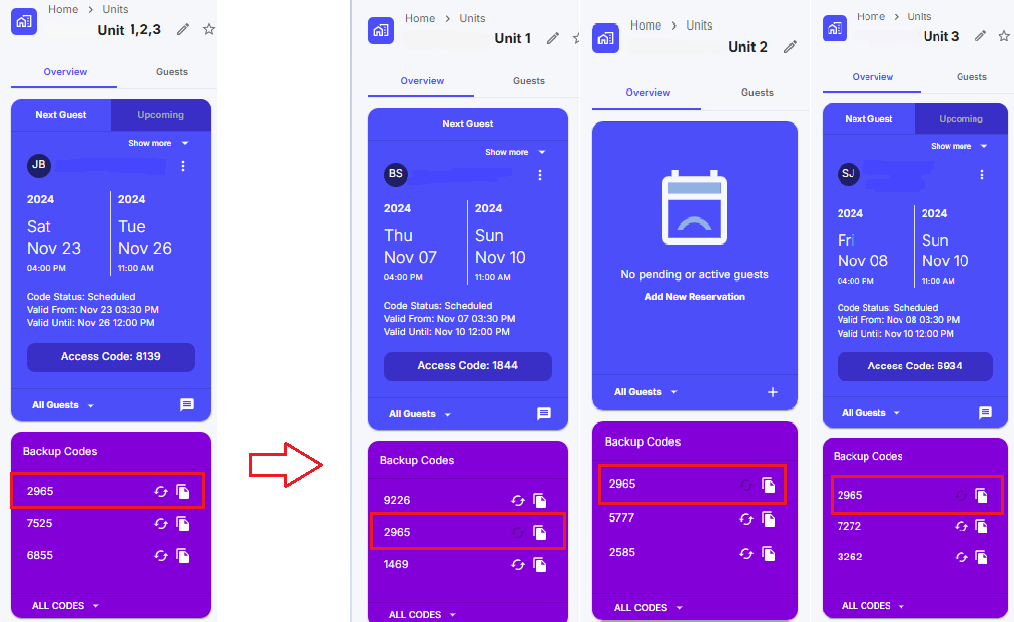
Virtual Door Codes: These codes will appear in all connected Primary Units. As seen in the example below.
Steps to Delete a Backup Code from a Primary Unit
-
Refresh Code at Primary Unit Level:
-
To replace the current backup code, press the 🔄 (refresh) button.
-
A new code will appear at the end of the list, keeping the order by creation date.
-
View and Manage Backup Codes:
-
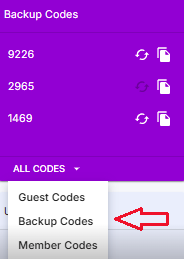
Go to All Codes → Backup Codes to see a list of all backup codes.
-
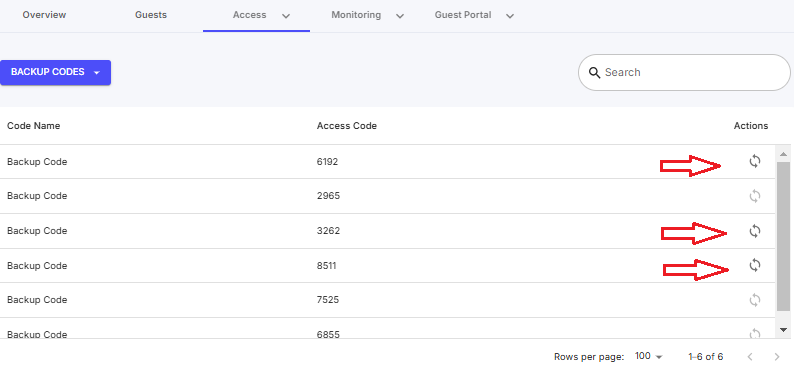
Here, you can also press the 🔄 button next to a Primary Unit backup code to delete it and generate a new one.
Note: The backup code provided to the guest depends on whether they booked through the Virtual Door listing or directly with the Primary Unit.