

FAQ's for Hostaway
When should I schedule the email with access codes to my guests?
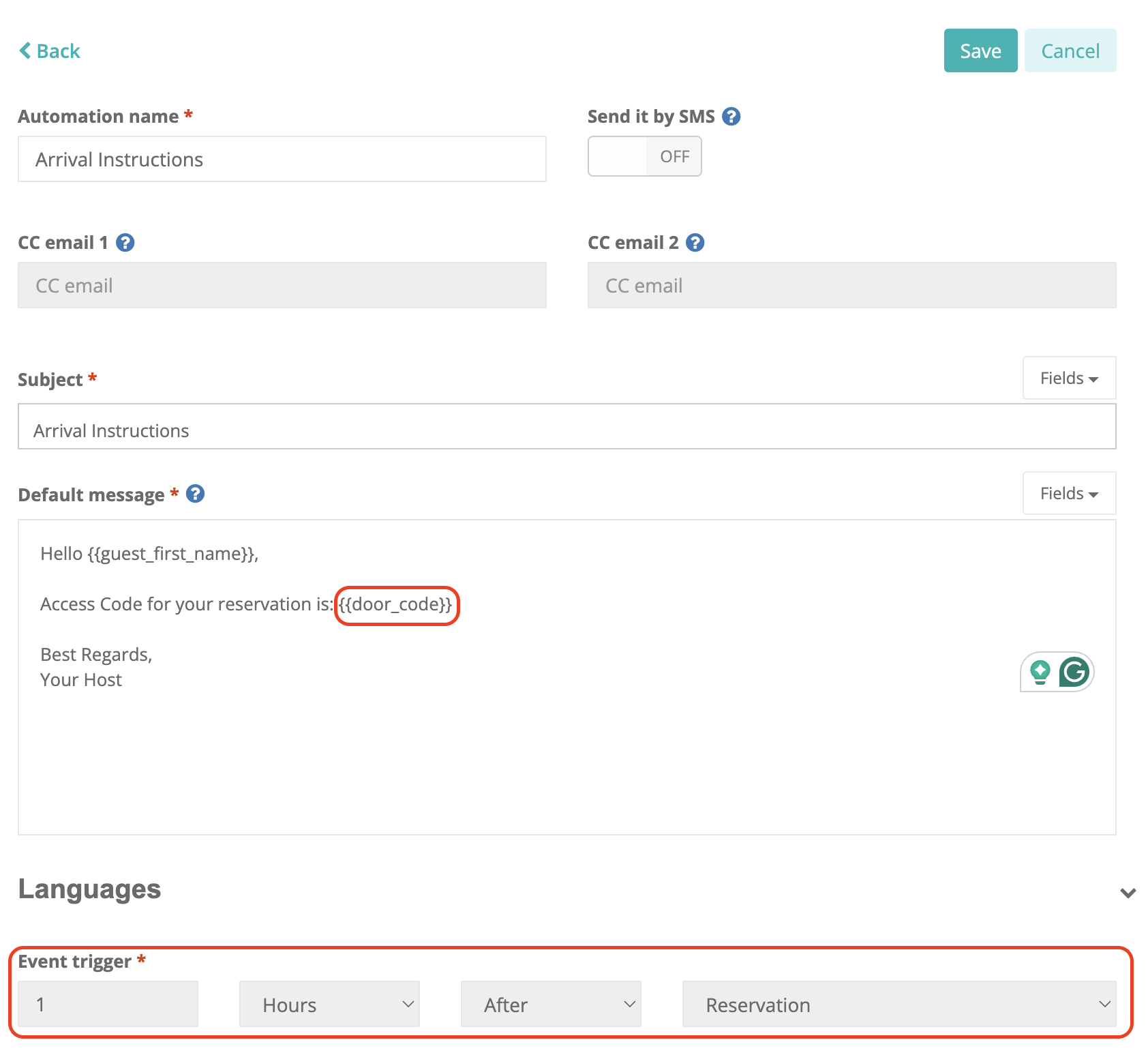
Guest messaging should be set up under "Automations". It is best practice to schedule the email with access codes to be sent 1 hour after the reservation has been created.
For last-minute reservations, Hostaway provides the "always trigger" / "impossible time" option, which ensures automations trigger even in time-critical scenarios. Below are common timing options:
- 48 hours prior to check-in
- 6 hours prior to check-in
- 1 day prior to check-in
Hostaway recommends using the "guest arrival (check-in)" trigger for best results.
What is the variable used to send access codes from Operto to Hostaway?
Check-in code: {{door_code}}
What is the variable used to send a Guest Portal link from Operto to Hostaway?
Operto Connect - Guest Portal: https://guests.operto.com/CompanyID_{{hostaway_reservation_id}}
The Company ID is available at the top of your Operto Connect dashboard.
Similar to access codes, we recommend scheduling the Guest Portal email 1 hour after the reservation is created. Make sure to select the channels from which your reservations are coming.
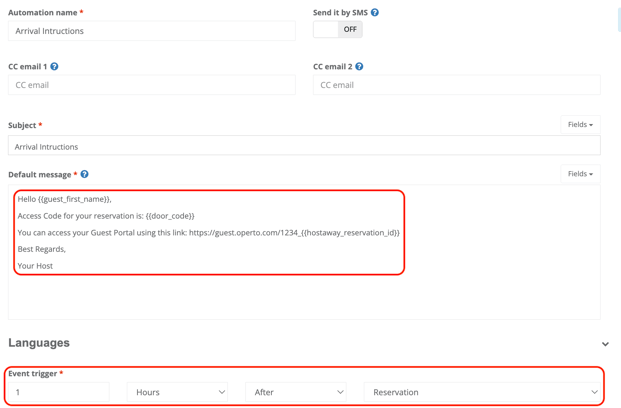
Ensure you select the appropriate Listing(s) from which guests should receive the Guest Portal and activate the "Always Trigger" box.
Note: When you are inserting the {{hostaway_reservation_id}} variable, please make sure that the variable is selected from the variable dropdown menu. If you type it in manually, the variable won’t work.
Can I cancel a guest reservation in the Operto dashboard?
No, all cancellations should be made directly in Hostaway.
Can I modify guest check-in/check-out times in the Operto dashboard?
Yes, but modifying the check-in/check-out times in Operto severs the connection with Hostaway, and no further updates will be received by Operto. It is strongly recommended to make these changes in Hostaway.
Can I modify guest check-in/check-out dates in the Operto dashboard?
Yes, but modifying the check-in/check-out dates in Operto also severs the connection with Hostaway, and no further updates will be received by Operto. It is strongly recommended to make these changes in Hostaway.
Can I create a new reservation directly in Operto?
Yes, you can. Select the unit and click 'Add New Reservation' from the top right of the page.
When I change a guest's room assignment, does the code follow to the new room?
Yes, the code should follow the reservation to the new room.