
Backup codes are meant to be given out to guests in the event that the original access code does not successfully install onto the lock. They are not meant to be used continuously as they are non-expiring and available all the time until deleted.
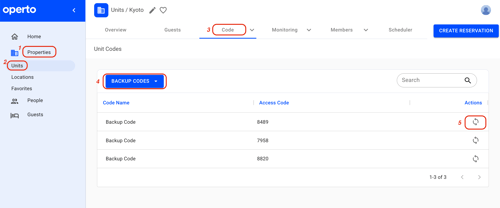
You can find back up codes by selecting:
Properties --> Units --> select the specific unit --> Code --> Access Codes --> Guest Codes --> Back up codes --> refresh code arrow.
Once you select this refresh button, a new code will be autogenerated immediately.
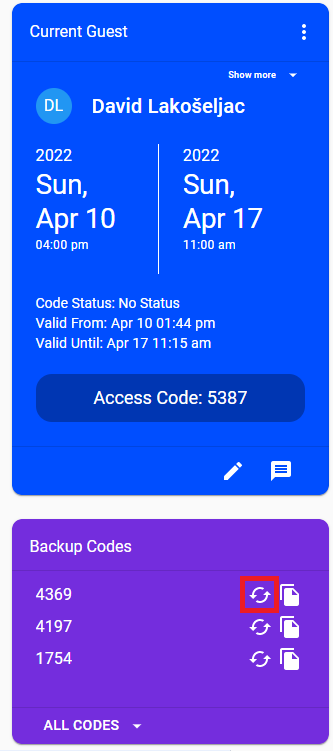
Alternatively, you can also use the shortcut from the unit page -
Press the 🔄 sign to remove the current backup code and install a new one automatically.
You can find back up codes by selecting:
Properties --> Units --> select the specific unit --> Code --> Access Codes --> Guest Codes --> Back up codes --> refresh code arrow.
Once you select this refresh button, a new code will be autogenerated immediately.
Alternatively, you can also use the shortcut from the unit page -
Press the 🔄 sign to remove the current backup code and install a new one automatically.